
Table of Contents
The CSIR NET 2026 application process is conducted completely online by the National Testing Agency (NTA) through the official portal. Candidates aspiring for Junior Research Fellowship (JRF), Assistant Professor eligibility, or PhD admission must complete registration, upload documents, pay the CSIR NET application fee, and download the confirmation page within the prescribed dates.
Understand the CSIR NET 2026 application process step by step to avoid mistakes, ensure successful registration, and prevent application rejection due to incorrect details or incomplete submissions.
CSIR NET 2026 Application Process Overview
The CSIR NET 2026 application process overview helps candidates prepare the required documents, image specifications, and payment details in advance. Since the entire registration process is conducted online, knowing the important application requirements ensures a smooth and error-free submission of the CSIR NET 2026 application form.
Particulars | Details |
Exam Name | |
CSIR NET 2026 Conducting Authority | National Testing Agency (NTA) |
CSIR NET 2026 Application Mode | Online Only |
CSIR NET Official Website | |
CSIR NET 2026 Registration Process | Online |
Number of CSIR NET 2026 Application Forms Allowed | One |
CSIR NET 2026 Document Upload Format | JPG/JPEG and PDF |
CSIR NET 2026 Photograph Size | 10 KB – 200 KB |
CSIR NET 2026 Signature Size | 10 KB – 50 KB |
CSIR NET 2026 Certificate Upload Size | 50 KB – 300 KB |
CSIR NET 2026 Application Fee Payment Mode | Debit Card, Credit Card, Net Banking, UPI |
CSIR NET 2026 Confirmation Page | Generated after successful fee payment |
CSIR NET 2026 Hard Copy Submission | Not Required |
CSIR NET 2026 Documents Required for Application Form
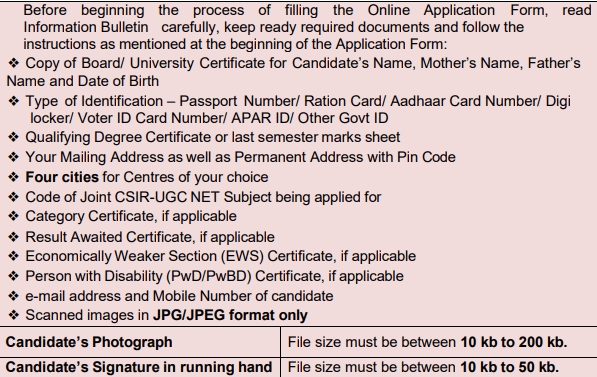
Before starting the CSIR NET 2026 application process, candidates should keep all the required documents ready to ensure smooth and error-free registration. Having the necessary identity proofs, educational certificates, category certificates, and contact details beforehand can help avoid last-minute issues while filling out the CSIR NET 2026 application form.
Identity Proof Required for CSIR NET 2026
Candidates can provide any one of the following valid government-issued identity proofs while registering for CSIR NET 2026:
- Aadhaar Card
- Passport
- Voter ID Card
- Ration Card
- DigiLocker ID
- APAR ID
- Any other valid Government ID
Educational Documents Required for CSIR NET 2026
Applicants should keep the following academic documents ready before filling the CSIR NET 2026 online application form:
- Master's Degree certificate or marksheet
- Last semester marksheet (for candidates pursuing their qualifying degree)
- Four-Year Bachelor's Degree marksheet (if applicable)
- Result Awaited Attestation Form (if applicable)
Category Certificates Required for CSIR NET 2026
Candidates claiming CSIR NET reservation benefits under the Government of India norms must possess valid certificates, including:
- SC Certificate
- ST Certificate
- OBC-NCL Certificate
- EWS Certificate
- PwD/PwBD Certificate
Address Details Required for CSIR NET Registration 2026
Candidates should keep their complete address details ready while applying for CSIR NET 2026, including:
- Permanent Address with PIN Code
- Correspondence Address with PIN Code
Providing accurate address details is important for future communication and verification purposes.
Contact Details Required for CSIR NET 2026 Application
Applicants must provide their own:
- Personal Mobile Number
- Personal Email ID
These contact details are used by the National Testing Agency (NTA) for all official communications related to the CSIR NET 2026 exam, including application status, admit card, answer key, and result notifications. Since these details cannot be changed later, candidates are advised to use an active email address and mobile number that they regularly access.
CSIR NET 2026 Image Specifications for Photograph, Signature and Certificates
Understanding the CSIR NET 2026 image specifications is essential for successful application submission. Candidates must upload their photograph, signature, and supporting documents in the prescribed file format and size specified by the National Testing Agency (NTA). Uploading incorrect or unclear files may lead to rejection of the CSIR NET 2026 application form, so applicants should ensure that all scanned images meet the required specifications.
Document | Format | File Size |
Passport-size Photograph | JPG/JPEG | 10 KB – 200 KB |
Signature | JPG/JPEG | 10 KB – 50 KB |
Result Awaited Certificate | 50 KB – 300 KB | |
Category Certificate | 50 KB – 300 KB | |
PwD/PwBD Certificate | 50 KB – 300 KB |
How to Apply for CSIR NET 2026? Step-by-Step Application Process
Understanding how to apply for CSIR NET 2026 is necessary for completing the registration process accurately and avoiding application rejection. The CSIR NET 2026 application process is conducted entirely online by the National Testing Agency (NTA). Following the step-by-step process carefully ensures successful submission of the CSIR NET 2026 online application form.
The CSIR NET 2026 registration process consists of four major stages:
- CSIR NET Registration 2026
- Filling the CSIR NET Application Form 2026
- Uploading Documents
- Payment of CSIR NET Application Fee 2026
Step 1: CSIR NET 2026 Registration
The first step in the CSIR NET 2026 application process is online registration. Candidates must visit the official CSIR NET portal and register using their personal details. After successful registration, a unique system-generated Application Number is allotted, which is required for all future login activities.
Candidates need to provide:
- Candidate's Name
- Father's Name
- Mother's Name
- Date of Birth
- Mobile Number
- Email ID
Important Instructions for CSIR NET 2026 Registration
- Use your own email ID and mobile number for registration.
- Only one mobile number and email ID are permitted per application.
- Registered contact details cannot be changed later.
- All future communication from NTA will be sent to the registered email ID and mobile number.
Step 2: Fill the CSIR NET 2026 Application Form
After completing registration, candidates must proceed to fill out the CSIR NET 2026 online application form. Applicants are required to enter personal, academic, and examination-related details carefully because incorrect information may lead to cancellation of candidature.
Personal Details
Candidates need to enter:
- Gender
- Category
- Nationality
- Identity Proof Details
Academic Qualification Details
Candidates should provide:
- Degree Obtained
- Marks Secured
- University Name
- Year of Passing
CSIR NET 2026 Subject Selection
Candidates must choose the subject corresponding to their discipline while filling the application form.
Subject Code | CSIR NET Subject |
701 | Chemical Sciences |
702 | Earth, Atmospheric, Ocean and Planetary Sciences |
703 | Life Sciences |
704 | Mathematical Sciences |
705 | Physical Sciences |
CSIR NET 2026 Examination City Preferences
Candidates are required to select four preferred examination cities in order of priority:
- First Choice
- Second Choice
- Third Choice
- Fourth Choice
Although NTA makes every effort to allot the CSIR NET 2026 examination centre according to the preferences chosen, candidates may be allotted a nearby city due to administrative or logistical reasons.
Step 3: Upload Documents for CSIR NET 2026 Application Form
Candidates must upload clear and valid scanned images in the prescribed format while submitting the CSIR NET 2026 application form.
Photograph Guidelines for CSIR NET 2026
The uploaded passport-size photograph should:
- Have a plain white background.
- Cover approximately 80% of the face.
- Clearly show both ears.
- Be without a mask.
- Avoid caps and goggles.
- Include regular spectacles, if used daily.
Important Instructions Regarding Photograph Upload
- Computer-generated photographs are not accepted.
- Distorted or unclear images may result in rejection.
- Fabricated photographs are treated as unfair means and may lead to cancellation of candidature.
Signature Guidelines for CSIR NET 2026
Candidates should:
- Use blue or black ink for signing.
- Upload a full running signature.
- Avoid writing the name in capital letters.
Signatures not matching the prescribed guidelines may lead to rejection of the application form.
Step 4: Pay CSIR NET 2026 Application Fee
The final stage of the CSIR NET 2026 online application process is fee payment. Candidates can pay the prescribed application fee through any of the following modes:
- UPI
- Net Banking
- Debit Card
- Credit Card
After successful payment, the CSIR NET 2026 Confirmation Page is generated automatically.
Important Note
Candidates must ensure successful fee payment because an application without payment remains incomplete and is liable to be rejected.
Can Candidates Complete the CSIR NET 2026 Application Form in Multiple Sessions?
Yes. Candidates can save the CSIR NET 2026 application form as a draft and complete the process later before the last date of registration.
The following stages can be completed separately:
- Registration
- Form Filling
- Document Upload
- Fee Payment
This feature allows candidates to fill the CSIR NET 2026 application form conveniently without completing all stages in one session.
Download CSIR NET 2026 Confirmation Page
After successful submission of the application fee, candidates should download and preserve the CSIR NET 2026 Confirmation Page for future reference.
Candidates should:
- Download the Confirmation Page.
- Take a printout for records.
- Keep it safely for future verification.
Candidates are not required to send the confirmation page or any hard copy of the application form to NTA, as the entire CSIR NET 2026 application process is conducted online.
Read Related Articles at:
- CSIR NET 2026: Complete Guide to Eligibility, Exam Pattern, Syllabus & Application Process
- CSIR UGC NET Notification 2026 Out: Apply Online, Exam Date, Eligibility, Exam Pattern & Important Dates
- CSIR NET 2026 Eligibility Criteria: Age Limit, Qualification, & Category-wise Relaxation
- CSIR UGC NET Syllabus 2026 PDF Download: Subject-Wise Syllabus and Preparation
Download CC Learning App and begin your CSIR NET 2026 preparation with expert guidance and a proven strategy to achieve JRF, Assistant Professor eligibility, and PhD admission!
Join Now!
Prepare for CSIR NET 2026 with CC Learning App
Cracking CSIR NET requires much more than just filling the CSIR NET application form. Success in the upcoming CSIR NET exam 2026 depends on conceptual clarity, consistent practice, strategic revision, and expert guidance.
CC Learning App, the best online coaching app for NTA UGC NET and CSIR NET preparations, provides
- Complete CSIR NET 2026 Syllabus Coverage
- Live and Recorded Classes
- Study Resources
- CSIR NET Previous Year Question Paper Discussions
- Topic-wise Practice Questions
- Full-Length Mock Tests
- Personal Mentorship
- Regular Revision Programs
Download CC Learning App and begin your CSIR NET 2026 preparation with expert guidance and a proven strategy to achieve JRF, Assistant Professor eligibility, and PhD admission.
Frequently Asked Questions on CSIR NET 2026
How can I apply for CSIR NET 2026?
Candidates can apply for CSIR NET 2026 only through the official NTA website, csirnet.nta.nic.in. The application process includes registration, filling the application form, uploading documents, paying the application fee, and downloading the confirmation page.
What documents are required for the CSIR NET 2026 application form?
Candidates need identity proof, educational certificates, category certificates (if applicable), passport-size photograph, signature, mobile number, email ID, and address details. Final-year students may also need a Result Awaited Attestation Form.
Can I fill the CSIR NET 2026 application form offline?
No. The CSIR NET 2026 application process is completely online. NTA does not accept offline application forms or hard copies.
What is the photo size required for the CSIR NET 2026 application?
The passport-size photograph must be uploaded in JPG/JPEG format and should have a file size between 10 KB and 200 KB.
What is the signature size required for CSIR NET 2026?
The signature should be uploaded in JPG/JPEG format with a file size between 10 KB and 50 KB.
Can I submit multiple CSIR NET 2026 application forms?
No. Candidates should submit only one application form. If multiple applications are submitted, only the first application will be considered and the remaining applications may be rejected.
Can I edit my CSIR NET 2026 application form after submission?
Yes. NTA provides a correction window during which candidates can modify certain details. Once the correction window closes, no further changes are allowed.
How many exam cities can be selected in CSIR NET 2026?
Candidates are required to select four examination cities in order of preference while filling out the application form.
Can I complete the CSIR NET 2026 application form in multiple sessions?
Yes. Candidates can save the application form as a draft and complete registration, document upload, and fee payment separately before the last date.
How can I pay the CSIR NET 2026 application fee?
The CSIR NET application fee can be paid online through UPI, Debit Card, Credit Card, or Net Banking.
Is it necessary to send the CSIR NET 2026 confirmation page to NTA?
No. Candidates are not required to send any hard copy or CSIR NET 2026 confirmation page to NTA. However, they should download and keep a copy for future reference.
Notifications
Trending Updates



Related Blogs
June 19, 2026
CSIR NET 2026: Complete Guide to Eligibility, Exam Pattern, Syllabus & Application Process
9 minute read
June 17, 2026
CSIR UGC NET Notification 2026 Out: Apply Online, Exam Date, Eligibility, Exam Pattern & Important Dates
12 minute read
June 19, 2026