
Table of Contents
The internet has made banking, shopping, education and communication easier, but it has also increased the risk of online scams, hacking, identity theft and data theft. Cybercriminals use different methods to steal money and misuse personal information. Understanding cyber security helps individuals protect their digital accounts and stay safe online. This article covers common cyber threats, safety tips, solutions, cybercrime helpline numbers in India, Kerala cybercrime cases and career opportunities in cybersecurity.
What Is Cyber Security?
Cyber security is the practice of protecting computers, smartphones, networks, websites and personal information from online attacks. It helps prevent hackers and cybercriminals from stealing data, accessing accounts or causing damage.
For example, cyber security protects your bank details during online transactions and keeps your devices safe from viruses and harmful software. In simple words, it means protecting your digital information and staying safe online.
How Does Cyber Security Work?
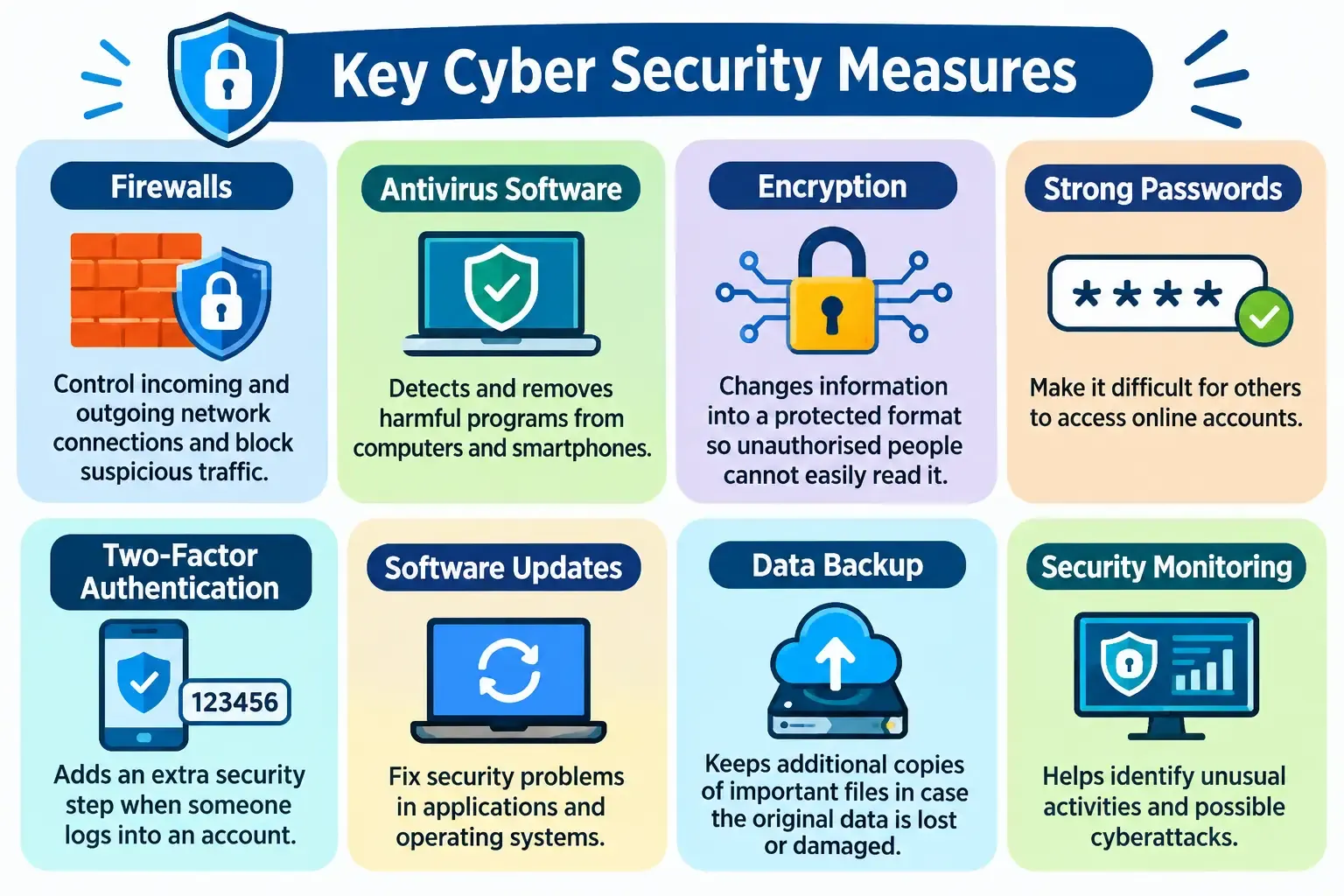
Cyber security uses different tools and safety measures to protect digital devices and information. Some important cybersecurity methods include:
Need more Details About CC's Cybersecurity Course
Enrol Now
What Are the Different Types of Cyber Security?
Cyber security has different areas that focus on protecting specific parts of digital systems.
1. Network Security : Network security protects computer networks from hackers and unauthorised access. Firewalls and network monitoring tools help prevent suspicious activities.
2. Application Security : Application security protects websites, mobile applications and computer software from security problems. Regular testing and software updates help improve application safety.
3. Information Security : Information security protects personal, financial and business information from theft, misuse or unauthorised changes.
4. Cloud Security : Cloud security protects information and applications stored on online platforms. It uses passwords, access controls and encryption to keep cloud data safe.
5. Endpoint Security : Endpoint security protects devices such as smartphones, laptops, tablets and desktop computers connected to a network.
6. Internet of Things (IoT) Security : IoT security protects internet-connected devices such as smart TVs, security cameras, smartwatches and home appliances.
7. Operational Security : Operational security focuses on how organisations manage access to important information. It includes security rules, employee permissions and safe data-handling practices.
8. Critical Infrastructure Security : This type of security protects important services such as electricity, water supply, transportation, hospitals and communication networks.
What Are the Common Cyber Security Threats and Their Solutions?
Cyber security threats are online activities that can steal information, damage devices, misuse accounts or cause financial losses. Knowing the common types of cyber threats can help people identify suspicious activities and protect themselves.
1. Phishing Attacks
Phishing is one of the most common types of cybercrime. Criminals send fake emails, SMS messages or WhatsApp messages that appear to come from trusted organisations. These messages may contain links to fake websites. When people enter their passwords, OTPs or bank details, criminals can steal that information.
Example: You receive a message claiming that your bank account will be blocked unless you update your KYC details through a link. The link takes you to a fake website.
How to Stay Safe:
- Do not click unknown links.
- Check the sender's details before responding.
- Never share your OTP or password.
- Visit the bank's official website to verify messages.
- Report suspicious messages.
2. Malware Attacks
Malware is harmful software designed to damage devices, steal information or access systems without permission. It may enter a device through unsafe downloads, fake applications, suspicious email attachments or infected websites. Common types of malware include viruses, spyware, worms and Trojans.
How to Stay Safe:
- Install trusted antivirus software.
- Download applications from official sources.
- Avoid opening unknown attachments.
- Keep your phone and computer updated.
- Do not download pirated software.
3. Ransomware Attacks
Ransomware is a type of malware that locks or encrypts files and demands money to restore access. For example, a business may suddenly lose access to its customer records and important documents because of a ransomware attack.
How to Stay Safe:
- Back up important files regularly.
- Avoid downloading suspicious attachments.
- Keep security software updated.
- Use strong passwords.
- Contact cybersecurity professionals if an attack occurs.
4. Identity Theft
Identity theft happens when someone steals and misuses another person's personal information. Criminals may misuse Aadhaar details, PAN information, photographs, phone numbers or other documents.
How to Stay Safe:
- Do not share personal documents with unknown people.
- Avoid uploading identification details to unverified websites.
- Use privacy settings on social media.
- Check bank statements regularly.
- Report suspected identity theft.
5. Password Attacks
Password attacks happen when criminals try to guess, steal or misuse passwords to access online accounts. Using the same password for banking, email and social media accounts can increase the risk.
How to Stay Safe:
- Create strong and unique passwords.
- Avoid using birthdays or phone numbers.
- Do not share passwords with anyone.
- Enable two-factor authentication.
- Use a trusted password manager.
6. UPI and Online Payment Fraud
UPI fraud happens when criminals trick people into making unwanted payments or sharing their payment details.
They may send fake payment requests, QR codes or links through WhatsApp and SMS.
How to Stay Safe:
- Never share your UPI PIN.
- Enter your UPI PIN only when making a payment.
- Remember that you do not need a UPI PIN to receive money.
- Check the receiver's name before transferring money.
- Avoid scanning unknown QR codes.
7. SIM Swapping
SIM swapping happens when criminals fraudulently obtain control of another person's mobile number. They may then receive OTPs and try to access the victim's banking or social media accounts.
How to Stay Safe:
- Never share personal details with unknown callers.
- Contact your mobile network provider if your SIM suddenly stops working.
- Inform your bank if you suspect SIM-related fraud.
- Secure your important online accounts.
8. Man-in-the-Middle Attacks
A man-in-the-middle attack happens when a criminal secretly intercepts communication between two people or systems.
For example, attackers may misuse unsecured public Wi-Fi networks to access information shared by connected devices.
How to Stay Safe:
- Avoid banking through public Wi-Fi.
- Use secure websites with HTTPS.
- Do not connect to unknown Wi-Fi networks.
- Use a trusted VPN when necessary.
9. Cyberbullying and Online Harassment
Cyberbullying means using social media, messaging applications or other online platforms to threaten, insult or harass someone.
It may involve abusive messages, fake accounts, sharing private photographs or spreading false information.
How to Stay Safe:
- Block and report abusive accounts.
- Save screenshots as evidence.
- Avoid responding to threats.
- Inform trusted people.
- Report serious incidents through official cybercrime channels.
10. AI and Deepfake Scams
Artificial intelligence is also being misused by cybercriminals. They can create fake videos, photographs and voice recordings that look or sound real. For example, a scammer may imitate the voice of a family member and ask for emergency financial help.
How to Stay Safe:
- Verify unusual money requests through a direct phone call.
- Do not trust every video or voice message.
- Avoid clicking suspicious links.
- Check investment advertisements through official sources.
- Report fake accounts and impersonation.
Real Cybercrime Cases in Kerala: Examples of Online Fraud
Cybercrime is a growing concern in Kerala. People are increasingly using online banking, UPI payments, social media and digital investment platforms. Criminals take advantage of these services to cheat unsuspecting users. The following reported cases show how cybercriminals target people in different parts of Kerala.
1. Kochi Businessman Loses ₹24.76 Crore in Online Investment Fraud
In September 2025, a businessman from Elamkulam, Kochi, reportedly lost around ₹24.76 crore in an online investment scam. Fraudsters allegedly contacted him through phone calls and Telegram and offered high returns through stock trading. They used a fake trading platform to show investment profits and encourage further payments.
When the victim tried to withdraw his money, he realised that he had been cheated. Kochi Cyber Police registered a case and started an investigation.
What Can We Learn?
- Do not trust investment offers that promise guaranteed high returns.
- Verify trading platforms before investing.
- Avoid transferring money to unknown accounts.
- Check whether investment services are registered with the relevant authorities.
2. Retired Doctor in Kochi Loses ₹1.30 Crore in Digital Arrest Scam
In March 2026, an 81-year-old retired doctor in Kochi reportedly lost ₹1.30 crore in a digital arrest scam.
The fraudsters allegedly pretended to be CBI officials and claimed that the victim was connected to a criminal investigation. They used phone and WhatsApp video calls to threaten him and demand money.
The reported investigation led to the recovery of ₹1.06 crore.
What Can We Learn?
- Police officers do not conduct arrests through WhatsApp video calls.
- Government officials will not demand money for digital verification.
- Never transfer money because of threats made over the phone.
- Contact the police if someone threatens you using a fake legal case.
3. Kannur Doctor Loses ₹4.43 Crore in Online Trading Scam
In August 2025, a doctor from the Mattanur area of Kannur reportedly lost ₹4.43 crore in an online share-trading scam.
The victim was allegedly contacted through WhatsApp and attracted by promises of high investment returns. The investigation reportedly led to the arrest of two people accused of providing bank accounts used in the fraud.
What Can We Learn?
- Be careful with investment groups on WhatsApp and Telegram.
- Do not trust unknown stock market advisers.
- Check financial platforms before investing.
- Avoid transferring money to personal bank accounts for investment purposes.
Cyber Security Helpline Number in India: How to Report Online Fraud
If you become a victim of online fraud, reporting the incident immediately is very important. Quick reporting may help authorities trace fraudulent transactions and take steps to prevent further financial loss. The Government of India provides dedicated services for reporting cybercrime.
Important Cybercrime Helpline Numbers
Service | Number / Website | Purpose |
National Cyber Crime Helpline | 1930 | Reporting online financial fraud |
National Cyber Crime Portal | Filing cybercrime complaints | |
Emergency Helpline | 112 | Police and emergency assistance |
CERT-In | Reporting technical cybersecurity incidents |
What Is the 1930 Cyber Crime Helpline?
The 1930 cybercrime helpline is a national service that helps people report online financial fraud. If someone transfers money to a fraudster through UPI, internet banking, a debit card or another digital payment method, they should call 1930 immediately. Early reporting may help the authorities and banks take action to trace or hold the transferred funds.
How to Report Cybercrime Online in India?
Follow these steps to report an online fraud or cybercrime.
Step 1: Call 1930
Contact the National Cyber Crime Helpline immediately if you have lost money through online fraud.
Step 2: Visit the Official Cybercrime Website
Go to https://cybercrime.gov.in/ and select the appropriate complaint category.
Step 3: Enter the Required Information
Provide details about the incident, including the date, time, transaction information and contact details of the suspected fraudster, if available.
Step 4: Upload Supporting Evidence
Attach screenshots, transaction messages, bank statements and other relevant documents.
Step 5: Save the Complaint Number
Keep the complaint acknowledgement number for future reference.
Step 6: Contact Your Bank
Inform your bank immediately and request assistance in securing your account and reporting the fraudulent transaction.
Important: Do not wait until you have collected every document before calling 1930. Report financial fraud as quickly as possible.
What Is Kerala Police Cyberdome?
Kerala Police Cyberdome is a Cyber Centre of Excellence established to improve cybersecurity and support the prevention and investigation of cybercrime. It brings together police officials, technology experts, academic institutions and private organisations to address digital security challenges.
Its important activities include:
- Cybercrime prevention.
- Technical support for cybercrime investigations.
- Digital forensic assistance.
- Cybersecurity research.
- Training and awareness programmes.
- Identification of online threats.
Kerala Police has also introduced Cyberwall, an AI-powered digital safety assistant. It helps users assess suspicious messages, links, websites and phone numbers. Users can refer to the official Kerala Police Cyberdome and Cyberwall platforms for information about these services.
15 Important Cyber Security Tips to Stay Safe Online
Everyone should follow basic cyber safety practices while using the internet. These simple steps can help protect personal information, banking details and online accounts.
- Use Strong Passwords: Create long and unique passwords for your important accounts.
- Enable Two-Factor Authentication: Add an extra security step to your email, banking and social media accounts.
- Never Share OTPs: Do not share OTPs, UPI PINs, ATM PINs or passwords with anyone.
- Avoid Unknown Links: Do not click suspicious links received through SMS, email or WhatsApp.
- Download Safe Applications: Install apps only from official and trusted sources.
- Update Your Devices: Keep your smartphone, computer and applications updated.
- Use Secure Wi-Fi: Avoid accessing banking services through unknown public Wi-Fi networks.
- Back Up Important Files: Keep additional copies of important documents and photographs.
- Protect Social Media Accounts: Avoid sharing sensitive personal details publicly.
- Check Online Payments: Verify the receiver's name and amount before making a payment.
- Avoid Fake Job Offers: Never pay money to unknown people for online job opportunities.
- Verify Investment Platforms: Check financial services before transferring money.
- Be Careful with QR Codes: Scan QR codes only when you understand the payment or transaction.
- Protect Children Online: Teach children about suspicious messages, online strangers and cyberbullying.
- Report Cyber Fraud Quickly: Call 1930 if you become a victim of online financial fraud.
Cyber Security Careers: Job Opportunities, Skills and Courses
Cybersecurity offers growing career opportunities as more organisations move their services online. Students interested in technology can build relevant skills through online courses, expert-led classes and practical learning platforms, creating a pathway towards a career in this field.
Top Cyber Security Job Roles
Job Role | Main Responsibilities |
Cyber Security Analyst | Monitors systems and identifies security threats. |
Ethical Hacker | Tests systems with permission to find security weaknesses. |
Penetration Tester | Performs authorised cyberattack simulations to identify vulnerabilities. |
SOC Analyst | Monitors security alerts and investigates suspicious activities. |
Network Security Engineer | Protects computer networks from cyberattacks. |
Digital Forensics Investigator | Examines digital evidence related to cybercrime. |
Cloud Security Engineer | Protects cloud-based applications and information. |
Security Consultant | Advises organisations on cybersecurity risks and protection. |
Application Security Engineer | Identifies and fixes security problems in software. |
Incident Response Specialist | Helps organisations respond to and recover from cyberattacks. |
What Skills Are Required for a Cyber Security Career?
People interested in cybersecurity should develop technical knowledge and problem-solving skills.
Important skills include:
- Computer fundamentals.
- Networking knowledge.
- Linux and Windows operating systems.
- Programming basics such as Python.
- Database knowledge and SQL.
- Network security.
- Ethical hacking fundamentals.
- Vulnerability assessment.
- Digital forensics.
- Communication and analytical skills.
Cyber Security Courses and Certifications
Students and working professionals can develop cybersecurity knowledge through degree programmes, online courses and professional certifications. Some recognised cybersecurity certifications include:
Certification | What You Learn |
CompTIA Security+ | Basic cybersecurity concepts and security practices |
Certified Ethical Hacker (CEH) | Ethical hacking and security testing |
CISSP | Advanced information security management |
CISM | Information security management |
Cisco Certified CyberOps Associate | Security operations and threat monitoring |
CISA | Information systems auditing |
Before enrolling, check the eligibility requirements, course details and examination information on the respective official websites.
Join now on the Best Cybersecurity Course by CC Learning App
Download Now
Frequently Asked Questions
1. What is cyber security in simple words?
Cyber security means protecting computers, smartphones, online accounts, networks and personal information from hackers, cyberattacks and online fraud.
2. Why is cyber security important?
Cyber security protects personal information, banking details, online accounts and business data. It also helps prevent identity theft, financial fraud and unauthorised access.
3. What are the 5 main types of cyber security?
The five important types of cyber security are network security, application security, information security, cloud security and endpoint security.
4. What are the most common cyber security threats?
Common cyber threats include phishing, malware, ransomware, identity theft, password attacks, UPI fraud, SIM swapping and deepfake scams.
5. What is the cybercrime helpline number in India?
The national cybercrime helpline number in India is 1930. It helps people report online financial fraud.
6. How can I report cybercrime in Kerala?
You can report cybercrime by calling 1930, visiting the official website cybercrime.gov.in or approaching the nearest police station.
7. What should I do if I lose money through online fraud?
Immediately call 1930, inform your bank, file a complaint through the National Cyber Crime Reporting Portal and save all transaction details and supporting evidence.
8. What is a digital arrest scam?
A digital arrest scam is a fraud in which criminals pretend to be police officers or government officials and threaten people with arrest through phone or video calls. They demand money using false legal claims.
9. Can cybercriminals hack smartphones?
Yes. Criminals may access smartphones through harmful applications, suspicious links, unsafe downloads and software security weaknesses. Keeping devices updated and using trusted applications can reduce these risks.
10. What is the difference between cyber security and ethical hacking?
Cyber security is the overall practice of protecting digital systems and information. Ethical hacking is a specialised activity in which professionals test systems with permission to identify security weaknesses.

Trending Updates



Related Blogs
February 21, 2026
7 Essential Types of Cybersecurity: The Complete Guide for 2026
6 minute read
December 20, 2025
Why Cybersecurity Courses Really Matter in 2026?
4 minute read
July 20, 2026
Cyber Security Analyst Interview Questions for Freshers & Experienced Candidates
11 minute read
March 21, 2026